How can I change a user’s access code?
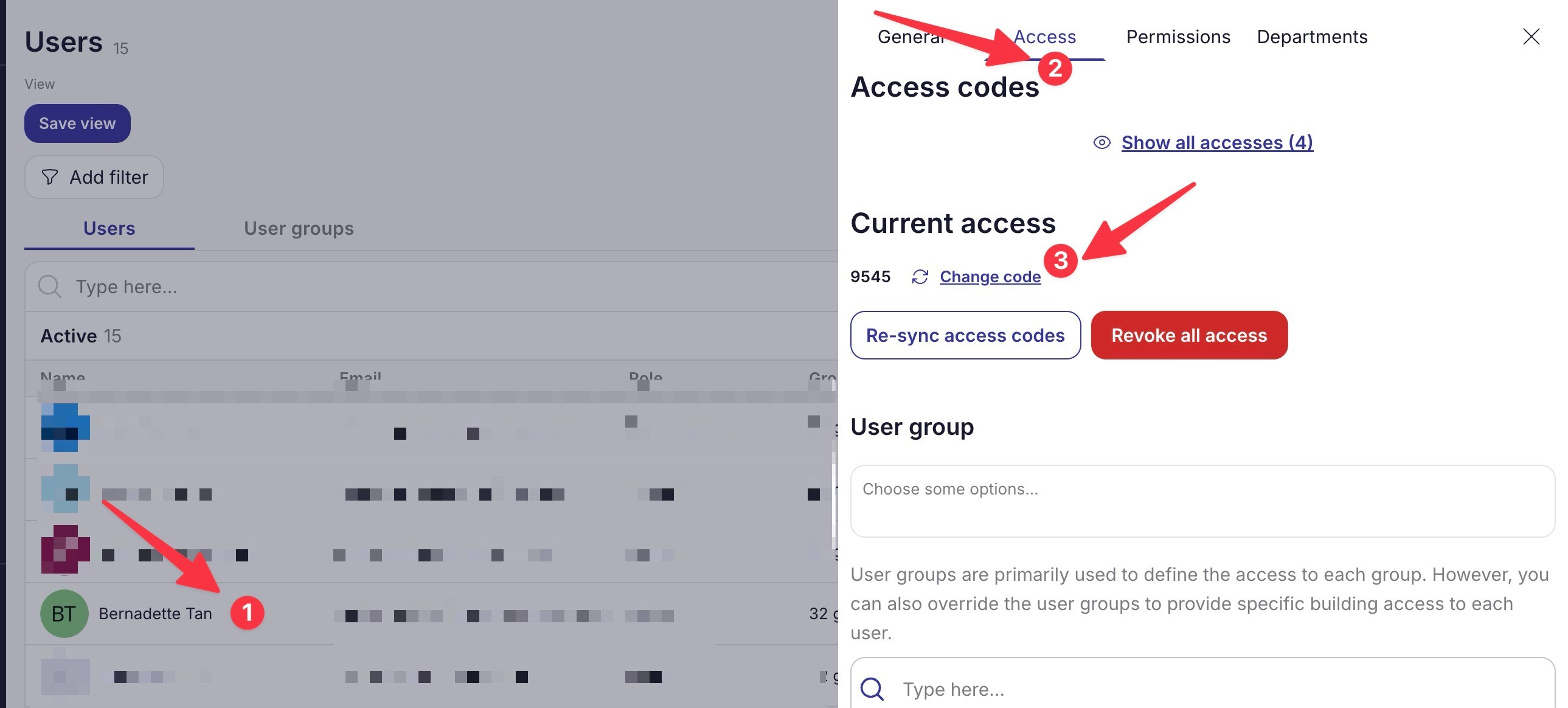
You might need to give a user a code they already know, to do this you can change the user’s random code. To update a team member’s access code,
-
Navigate to the Users page (Organization > Users)
-
Select the user whose code you want to update
-
Go to the Access tab
-
Click Change Code under Current access
-
Choose the new code
-
Wait for the new access to sync
Why Is a Team Member’s Portal View Empty?
If a team member can’t see anything on their portal using their log in or if there are properties or group that they can’t see on their end, you might need to check the permissions.
-
Navigate to the Users page (Organization > Users)
-
Select the user whose code you want to update
-
Go to the Permissions tab
-
Click Change Code under Current access
-
Choose the new code
-
Wait for the new access to sync
What Can Each User Role Access?
There are five user roles you can assign:
-
Admin – Full access to all features.
-
Manager – Can view all categories but cannot delete** Guides, Properties and Groups, Tasks, Task Templates, Workflows, or Users**. Additionally, they** cannot** access** Setup Guide, Accounts, Staff Codes, or Logs**.
-
Standard – View-only access with no permissions to modify anything. Restricted from** Workflows, Integrations, Organization, Account, and Lock Codes**.
-
Custom – Allows you to manually select specific permissions for the user.
Which Actions Can Be Controlled Through Permissions?
Here are the Categories under Permissions:
-
Dashboard
-
Devices — View, Manage and Control
-
Guides — View, Manage, and Delete
-
Properties & Groups — View, Manage, and Delete
-
Reservations — View and Manage
-
Payments — View and Manage
-
Tasks — View, Manage, and Delete
-
Task template — View, Manage, and Delete
-
Workflows — View, Manage, and Delete
-
Integrations — View and Manage
-
Organization — View, Manage, and Setup Guide
-
Users — View, Manage, and Delete
-
Access — Smart Code Access
-
Account — View Account Owner and Admin
-
Lock codes — View guest/backup code, Manage lock codes, and View Staff Codes
-
Other — View Events, Analytics, and Logs