Keep guests comfortable while protecting your HVAC systems and controlling utility costs—all enforced automatically.
Your equipment and energy bills will thank you. ❄️🔥
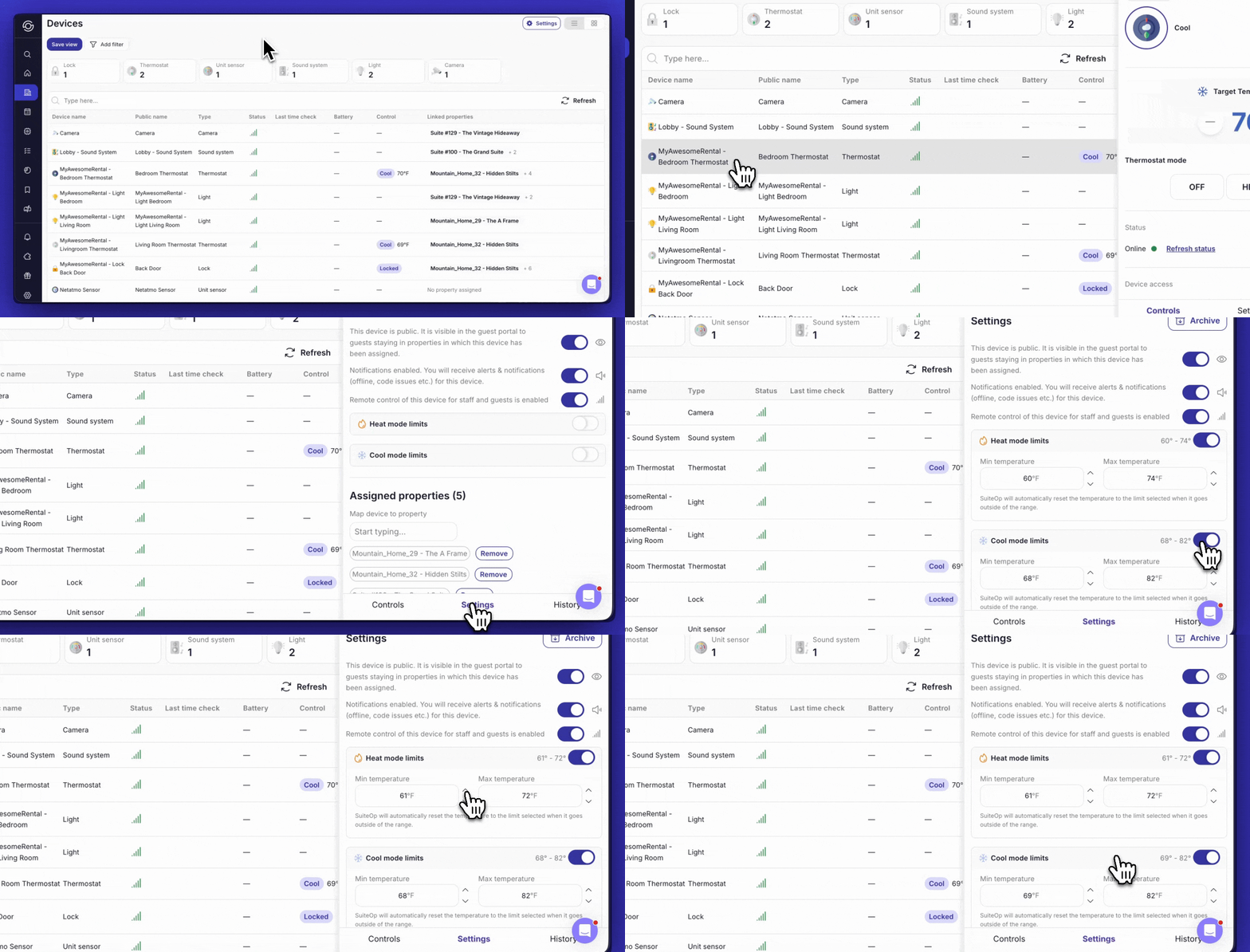
How to Set Temperature Limits
Temperature limits are configured in the Settings panel for each thermostat device.
Accessing Thermostat Settings
-
Navigate to Devices in the SuiteOp platform
-
Locate the thermostat you want to configure
-
Click on the thermostat to open its details
-
Select the Settings tab
Configuring Heat Mode Limits
-
In the Settings panel, locate the Heat mode limits section
-
Toggle the switch to enable Heat mode limits
-
Set the Min temperature using the dropdown menu
This is the lowest temperature guests can set when heating
- Set the Max temperature using the dropdown menu
This is the highest temperature guests can set when heating
- The configured range will be displayed (e.g., 60° - 74°)
Note: SuiteOp will automatically reset the temperature to the limit selected when a guest adjusts the thermostat outside of the configured range.
Configuring Cool Mode Limits
-
In the Settings panel, locate the Cool mode limits section
-
Toggle the switch to enable Cool mode limits
-
Set the Min temperature using the dropdown menu
This is the lowest temperature guests can set when cooling
- Set the Max temperature using the dropdown menu
This is the highest temperature guests can set when cooling
- The configured range will be displayed (e.g., 68° - 82°)
Note: SuiteOp will automatically reset the temperature to the limit selected when a guest adjusts the thermostat outside of the configured range.
How Temperature Limits Work
Once temperature limits are enabled and configured:
-
Guest Makes Adjustment: A guest uses the thermostat controls (in-unit or through the guest portal) to change the temperature
-
SuiteOp Monitors: The system detects the temperature change and checks it against your configured limits
-
Automatic Reset: If the requested temperature is outside your limits, SuiteOp immediately resets the thermostat to the nearest allowed temperature
-
Transparent to Guest: The adjustment happens automatically in the background
Example Scenarios
Scenario 1: Cooling Mode — Your Cool mode limits are set to 68° - 82°. A guest attempts to set the thermostat to 65°. SuiteOp automatically resets the temperature to 68° (the minimum allowed temperature).
Scenario 2: Heating Mode — Your Heat mode limits are set to 60° - 74°. A guest attempts to set the thermostat to 78°. SuiteOp automatically resets the temperature to 74° (the maximum allowed temperature).
Best Practices
Set Reasonable Ranges — Configure limits that prevent extremes while still allowing guests to personalize their comfort. Ranges that are too restrictive may lead to guest dissatisfaction.
Consider Climate and Season — Adjust your temperature limits based on outdoor conditions. Cooling limits appropriate for summer may need adjustment for shoulder seasons.
Different Limits for Heat and Cool — Take advantage of the ability to set different ranges for heating and cooling modes. Heating typically requires a different range than cooling.
Recommended Ranges:
-
Cool mode: 68°F - 82°F (allows comfortable cooling without excessive AC use)
-
Heat mode: 60°F - 74°F (allows comfortable heating without excessive energy consumption)