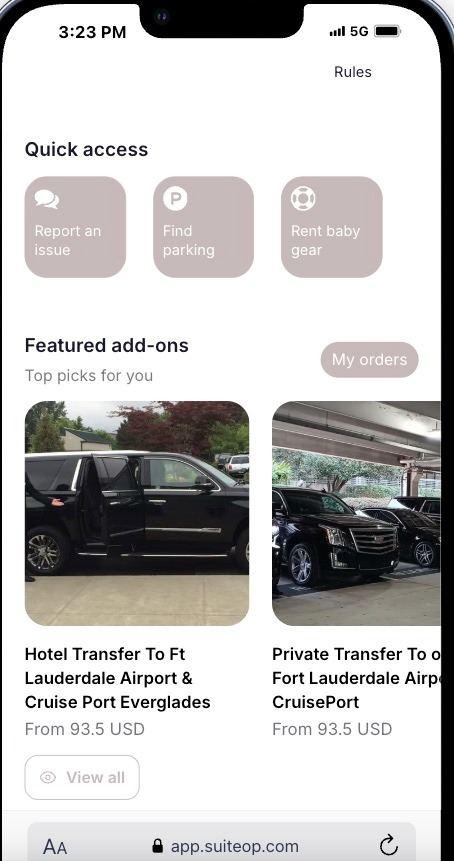
Depending on the service you’d like to suggest, here’s a sample of how you can feature an upsell in the Additional Guest Questions section:
Sample Offer: Airport Transportation
You can feature an upsell in the Additional Questions section under** Verify** in SuiteOp. Follow these steps to connect it:
-
Log in to Your SuiteOp Portal Access your SuiteOp account and navigate to the Portal.
-
Navigate to the Portal > Verify Section Go to the Verify section within the portal.
-
Go to Additional Questions Once in the Verify section, find and select the** Additional Questions** option.
-
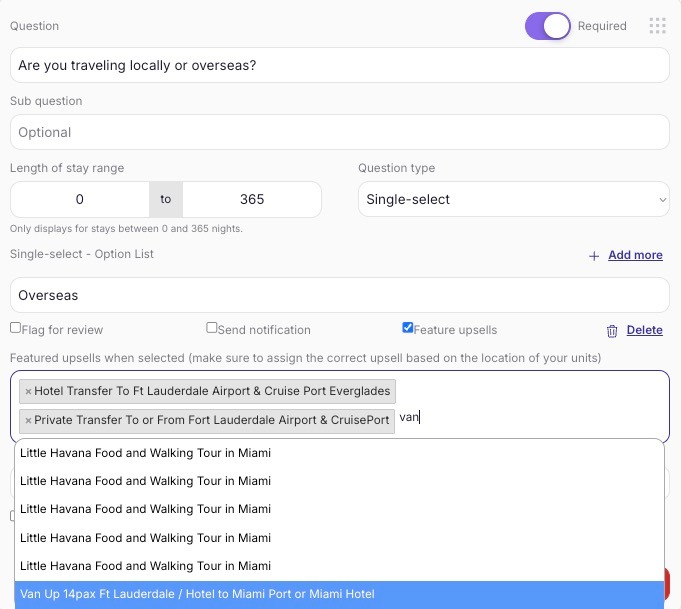
Select the Relevant Question Choose or create the relevant question you want to ask your guests, like:“Are you traveling locally or overseas?”
-
Enter Guest Selections Options Provide two options for the guest** Locally**
-
Overseas
-
Activate the Airport Transfer Option for Overseas Guests If the guest selects Overseas, this will activate the feature upsell
Select the upsells for Airport Shuttle
-
-
Assign to the Portal After entering the selections and activating the feature upsell, the final step is to assign the question to the portal. This will ensure that the question and upsell options are visible to guests during their booking process.
-
No need to manually save, as SuiteOp will auto-save your settings.
Upsell: Featuring an Offer in Additional Guest Questions
If the specific upsell that you wish to offer is not added in Portal > Upsell, follow these steps to add it:
-
Go to Portal > Upsell
-
Click “Add New”
-
Select “Viator” as the provider
-
Choose the city where the service is available
-
Filter by Airport & Hotel Transfers📌 This is just a sample. Be sure to adjust the upsell type based on what you wish to offer.
Once they select Overseas, the upsell will then show on their portal as a featured add-ons